
Managing mobile utility expenses has evolved far beyond physical queues and paper bills. For users in Sri Lanka relying on Airtel connections, taking care of monthly statements or topping up credit can be completed entirely online from the comfort of a home desk or mobile device. Whether you are handling a postpaid billing cycle or pushing an urgent reload to a line, utilizing digital options cuts down transit time and prevents unexpected disconnections.
The Shift Toward Digital Telecom Management
Physical customer service centers and local retail reload counters have long been the traditional mainstays for managing phone accounts. However, relying exclusively on physical locations comes with clear drawbacks. Operating hours, travel logistics, and long lines often disrupt busy daily schedules.
By shifting these routines to the official web portals and digital apps, subscribers gain instant control over their accounts. A digital-first approach means you can clear an overdue bill late at night, push an emergency reload while traveling, or check detailed data balances in real time without talking to customer support.
Preparing for Your Online Transaction
Before navigating to the payment gateway, a little preparation helps ensure the process goes smoothly. Having the right details on hand prevents transaction failures or errors on the wrong number.
- Verify the Mobile Number: Double-check the exact 10-digit Airtel number (beginning with the standard 075 prefix) that requires the payment or reload.
- Know the Outstanding Balance: For postpaid users, log into your mobile app or review your latest digital e-bill statement to confirm the precise amount due so you avoid underpaying or leaving a residual balance.
- Keep Payment Instruments Ready: Online portals accept standard local and international credit or debit cards (such as Visa and Mastercard) that have online transactions enabled. Ensure your card has active SMS OTP verification enabled to approve the payment securely.
Step-by-Step Guide to Using the Airtel Online Recharge and Payment Portal
Airtel provides a dedicated web portal explicitly built to handle reloads and bill settlements without requiring users to log into a heavy smartphone application.
Step 1: Navigate to the Official Portal
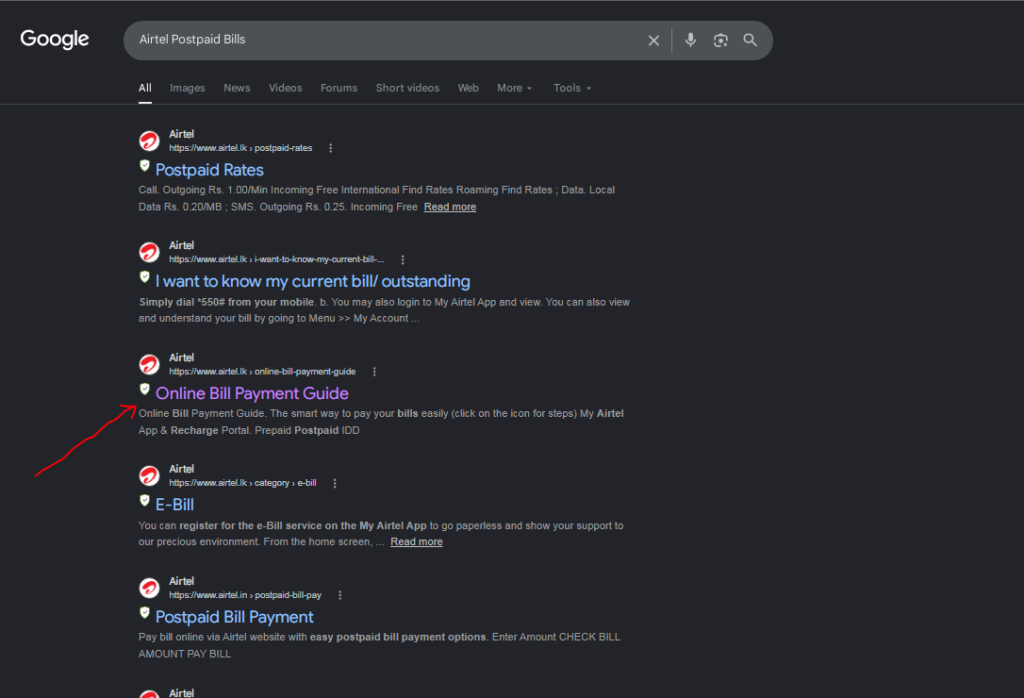
Open your preferred web browser on a smartphone, tablet, or desktop computer. Head directly to the official Airtel Sri Lanka recharge and payment portal ([https://recharge.airtel.lk/](https://recharge.airtel.lk/)).
Step 2: Input Your Mobile Details
On the landing interface, locate the input fields for mobile information.
.
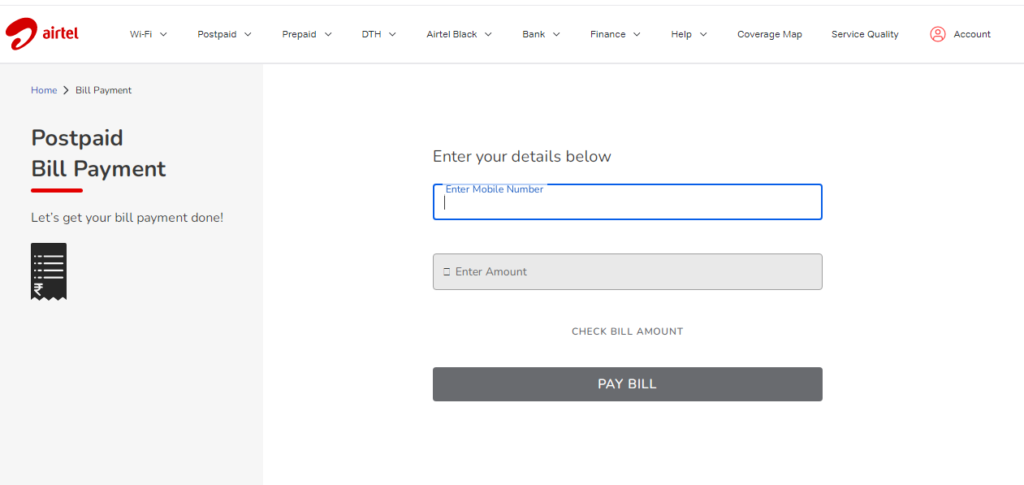
- Enter your 10-digit Airtel mobile number, starting after the preset
075country prefix box. - Select or check the package category if you are opting for a specific bundle, or move directly to entering the precise currency amount.
Step 3: Specify the Payment Amount
Type in the exact numerical value you wish to pay or reload. For postpaid accounts, input the exact bill total. For prepaid reloads, enter the denomination of the recharge value or select an active freedom pack matching your preference.
Step 4: Authorize and Complete Secure Payment
Proceed to the payment gateway selection screen. Enter your valid debit or credit card credentials—including the card number, expiry date, and CVV security code. Complete the bank’s two-factor authentication (such as entering the OTP sent to your registered mobile number). Once approved, a confirmation screen will appear indicating that the transaction was successful, and funds or bill clearances will reflect on your Airtel connection almost instantly.
Alternative Digital Avenues for Airtel Accounts
If you prefer managing your accounts through alternative channels, Airtel also supports various mobile applications and popular third-party digital wallets in Sri Lanka.
- The My Airtel App: Downloading the official self-care app gives you a comprehensive dashboard to monitor data buckets, view past usage histories, switch active packages, and settle payments.
- Third-Party Financial Apps: Many local banking applications and digital wallets—including FriMi, Dialog Ez Cash, and various bank mobile platforms—feature integrated utility bill hubs where you can look up and clear your Airtel postpaid account using saved bank balances.
Embracing these digital portals streamlines your monthly routine, keeping your mobile line active and funded with minimal effort.
Read more related articles:
How to Convert Your Main Airtel Credit Balance into Active Data Packages
Pay your bill from the official web portal: Click here
Frequently Asked Questions
You can access the dedicated platform directly by navigating to the official Airtel Sri Lanka recharge and payment web portal at [https://recharge.airtel.lk/](https://recharge.airtel.lk/https://www.airtel.in/postpaid-bill-pay).
You must ensure you have your correct 10-digit Airtel mobile number (starting with the 075 prefix), your exact bill or reload amount, and a valid debit or credit card with online transactions enabled.
Transactions processed through the online portal typically reflect on your Airtel connection almost instantly following successful payment confirmation.
Yes, you can use the official My Airtel app or integrated utility payment hubs available through various local banking and digital wallet applications in Sri Lanka.