
Personalizing your mobile phone goes far beyond changing wallpapers or setting custom notification sounds. For years, caller ringback tone services have allowed users to replace the standard ringing sound heard by callers with popular music tracks, sound effects, or even personalized business promos. In Sri Lanka, SLT-Mobitel offers this capability through its dedicated mTune platform.
Whether you want to showcase your music taste, play the latest chart-topping hits, or set up a professional audio clip for incoming business calls, understanding how the Mobitel mTune ecosystem operates is essential. This comprehensive guide covers everything you need to know about activating the service, understanding subscription and song charges, browsing options, and managing deactivation when you no longer need it.
What Is the SLT-Mobitel mTune Service?
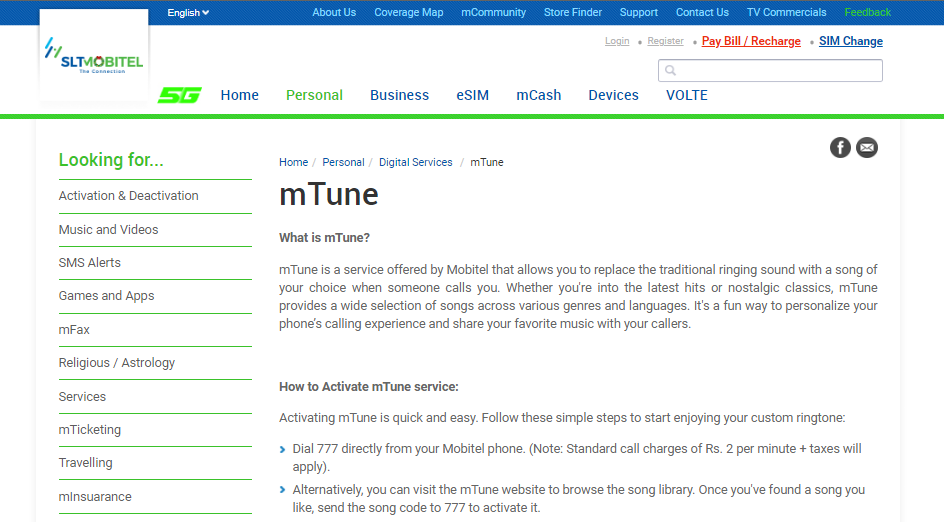
At its core, mTune is a customized ringback tone service. Instead of the standard, monotonous ringing tone that someone hears when they dial your mobile number, they are greeted by a song, instrumental piece, or voice track of your choice.
The service bridges personal expression and telecommunication, drawing from a vast library of Sinhala, Tamil, English, and Hindi tracks spanning various genres and eras. For entrepreneurs and small business owners, Mobitel even offers specialized business mTune variations, allowing you to use a custom audio track to promote your enterprise directly to clients who call your line.
Step-by-Step Guide to Activating mTune
Activating the mTune service on your Mobitel line can be accomplished through a couple of direct methods, depending on whether you prefer browsing via voice prompts or utilizing the online web portal.
Method 1: Activation via Voice Portal (IVR)
- Dial 777 directly from your Mobitel mobile phone. Note that standard IVR call charges apply (typically around Rs. 2.00 per minute plus applicable taxes).
- Listen carefully to the automated voice menu to navigate through the song categories or search for specific tracks.
- Follow the voice prompts to activate both the main service subscription and your chosen song.
Method 2: Activation via the Web Portal and SMS
- Open your web browser and visit the official Mobitel mTune portal (
[https://mtunes.mobitel.lk/](https://mtunes.mobitel.lk/)) to browse through the extensive song library. - Locate your preferred song code (for instance, individual tracks feature unique identification numbers).
- Send the respective song code or activation instruction via SMS to 777 or the designated short code to apply it directly to your mobile profile.
Breakdown of Charges and Pricing Structures
Because mTune is a value-added service featuring copyrighted musical content, it operates on a recurring subscription model split into two primary components: a Service Fee (maintaining the active profile) and a Content/Song Fee (for the specific music tracks assigned to your line).
The exact cost structure differs depending on whether you are using a prepaid or postpaid connection.
1. Prepaid Customer Packages
Prepaid subscribers have flexibility, choosing between a daily auto-renewal plan or a monthly auto-renewal structure.
- Daily Package:
- Subscription Charge: Rs. 2.50 + taxes (charged on a daily auto-renewal basis).
- Song Charge: Rs. 4.20 + taxes per song (subject to daily validity rules).
- Monthly Package:
- Subscription Charge: Rs. 151.00 + taxes (charged on a monthly auto-renewal basis).
- Song Charge: Rs. 50.00 + taxes per song (monthly validity).
2. Postpaid Customer Packages
Postpaid subscribers typically utilize a stable monthly billing cycle.
- Monthly Auto-Renewal Package:
- Subscription Charge: Rs. 151.00 + taxes/month.
- Song Charge: Rs. 50.00 + taxes per song/month.
Note: All listed subscription and content charges are subject to standard government taxes, levies, and variable telecommunication fees.
Managing, Changing, and Deactivating Your Tunes
As your musical tastes shift, you will likely want to swap out your active ringback songs or clear out tracks you no longer want attached to your profile.
How to Manage Multiple Songs
If you have multiple songs active on rotation, you can manage them by dialing 777, listening to the automated menu instructions, and selecting Option 8 to review, delete, or modify specific content items.
How to Deactivate the mTune Service Entirely
If you decide you no longer wish to use the service and want to stop recurring daily or monthly deductions, deactivation is straightforward and can be completed via several channels:
- Via SMS: Send a text message containing the word UNSUB to 777.
- Via Voice Menu: Dial 777 from your phone and navigate through the interactive voice response system to locate and confirm the cancellation prompt.
- Via Web Portal: Log into your account dashboard on the official mTune web portal and follow the service termination steps.
- Via Customer Support: Contact the Mobitel customer care team directly by dialing the 1717 hotline to request a manual service deactivation.
Once successfully deactivated, all recurring charges for both the service subscription and associated song renewals will cease immediately, and callers will hear the standard ringing tone once again.
Frequently Asked Questions
You can activate the service by dialing 777 and following the interactive voice response prompts, or by visiting the official Mobitel mTune web portal.
For monthly packages, the service subscription is Rs. 151.00 plus taxes, and individual songs cost Rs. 50.00 plus taxes per month.
Yes, prepaid users can opt for a daily package featuring a subscription charge of Rs. 2.50 plus taxes and song charges of Rs. 4.20 plus taxes.
You can deactivate the service by sending an SMS with the text UNSUB to 777, dialing the 777 voice menu, or contacting customer care at 1717.
Get more details: visit the official website. Click here
Read more related articles:
Mobitel Unlimited Data Packages: Complete Guide, Prices, and FUP (2026)