
What is Dialog Router Data Usage
Managing home or office internet consumption effectively requires a clear understanding of your active allowances, especially when juggling different quotas like peak, night-time, and anytime data. For broadband subscribers using network providers in Sri Lanka, keeping track of how much data remains in your billing cycle prevents unexpected speed throttling or expensive top-ups. Utilizing the official Dialog Broadband Usage Meter portal provides a straightforward way to audit your daily consumption, monitor remaining megabytes, and execute online FUP (Fair Usage Policy) extension purchases when your primary data pool runs dry.
Understanding the Dialog Broadband Usage Meter Portal
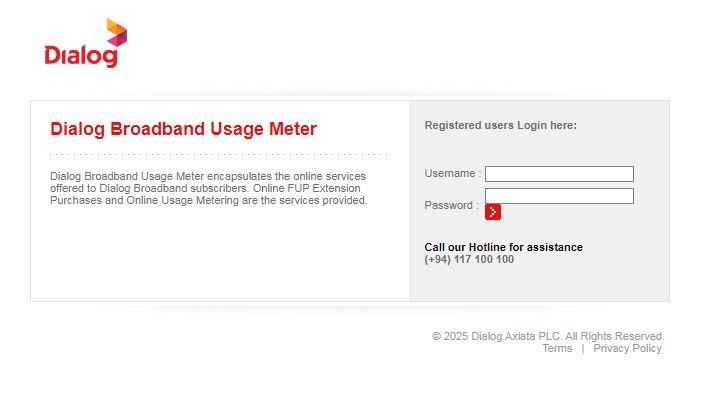
The Dialog Broadband Usage Meter is a dedicated online utility crafted specifically for Dialog broadband subscribers. Rather than guessing your consumption levels or waiting for SMS alerts that might arrive too late, this interface gives you real-time visibility into your account. The portal handles two primary functions for subscribers: online usage metering and online FUP extension purchases.
By logging into the system, you can see how your data is distributed across different categories. Many traditional or specialized packages split allowances into distinct buckets—such as daytime peak quotas, dedicated night-time quotas for heavy downloads, and flexible anytime data. Monitoring these metrics independently ensures you schedule heavy tasks like large software updates, system backups, or media streaming during the most cost-effective or unmetered hours available on your specific package.
How to Access Your Usage Statistics
Checking your quotas through the web portal involves a few simple steps:
- Navigate to the Portal: Open your web browser and go to the official Dialog Broadband Usage Meter login page.
- Enter Your Credentials: Input your registered username and password into the designated login fields on the right side of the screen.
- Submit and View: Click the red arrow execution button to access your dashboard. Once logged in, your active package details, remaining data balances for peak and off-peak hours, and billing cycle renewal dates will be displayed clearly.
If you encounter login hurdles or lose your account details, assistance is readily available. You can reach out directly to the customer support hotline at (+94) 117 100 100 for prompt technical troubleshooting.
Managing Peak, Night, and Anytime Quotas Wisely
To maximize your internet package without hitting restrictions mid-month, adopting smart tracking habits is essential:
- Prioritize Night Quotas for Heavy Downloads: If your package includes a separate night-time quota, schedule automatic downloads, operating system updates, and cloud backups to run exclusively during those designated late-night hours. This preserves your valuable anytime or peak data for critical daytime work, online classes, or professional meetings.
- Keep an Eye on Peak Hours: Peak periods typically see the heaviest network traffic. Monitoring your peak data consumption via the usage meter helps you pace your streaming and browsing habits over the course of the month.
- Utilize FUP Extensions When Necessary: If you exhaust your primary data quota before your billing cycle resets, the portal allows you to conveniently purchase online FUP extensions, instantly restoring high-speed connectivity without requiring a physical trip to a service center.
Best Practices for Seamless Broadband Tracking
Consistently monitoring your broadband connection safeguards your productivity and prevents frustrating interruptions. Make it a habit to check the portal midway through your billing cycle to gauge whether you are consuming data faster than anticipated. If you frequently run out of data before the month ends, it may be time to evaluate whether an upgrade to a higher-tier package or a specialized data add-on is more cost-effective for your household or business needs.
By combining routine portal checks with disciplined data habits, you maintain complete control over your home network, ensuring uninterrupted connectivity for remote work, entertainment, and everyday browsing.
Visit Dialog Usage Meter: Click Here
The portal encapsulates online services offered to Dialog broadband subscribers, specifically providing online usage metering and online FUP (Fair Usage Policy) extension purchases.
Registered users can log in by entering their username and password into the designated fields on the right side of the login page and clicking the red arrow execution button.
You can call the Dialog customer support hotline for assistance at (+94) 117 100 100.
Tracking your data across different quotas helps you manage your consumption, preserve anytime data by utilizing night quotas for heavy downloads, and prevent unexpected speed throttling.
You can conveniently purchase online FUP extensions directly through the portal to instantly restore high-speed connectivity.
Check out more related articles:
Top 5 Dialog Data Packages in Sri Lanka 2026
Dialog Air Fibre Packages Price and Details in Sri Lanka 2026