
Navigating mobile account top-ups, selecting specialized data packages, and processing digital payments efficiently is essential for seamless connectivity. For subscribers using the Airtel Sri Lanka telecommunications ecosystem, managing reloads through online web portals offers a quick alternative to traditional scratch cards and physical vendor visits.

Navigating the Airtel Reload and Payment Portal Interface
The digital reload portal for Airtel Sri Lanka is built around a clean, straightforward interface that lets users quickly initialize transactions. When you open the portal, the main dashboard features a dedicated entry field under the Reload & Payments heading.
- Mobile Number Input: The process starts by typing your 10-digit mobile number into the designated field (beginning with the standard local prefix like 75). Once a valid number is keyed in, the system validates the format and instantly populates the available reload amounts, youth packs, data top-ups, and structural voice bundles.
- Network Highlights and App Prompts: The left side of the dashboard frequently highlights network updates—such as live 5G network rollouts—alongside prominent call-out badges directing users to download the official mobile app from Google Play, the Apple App Store, or Huawei AppGallery for on-the-go account monitoring.
- Quick Navigation Links: A permanent Reload/Payment link sits in the top-right corner of the page, allowing users to jump straight back to the transaction hub from legal pages, FAQ sections, or general information layouts.
Understanding Available Packages and Pricing Structures
Once a valid mobile number is recognized by the web portal, users are presented with a wide array of curated pricing tiers tailored to different usage needs. These options span multiple categories, offering flexible choices for light browsers and heavy data users alike.
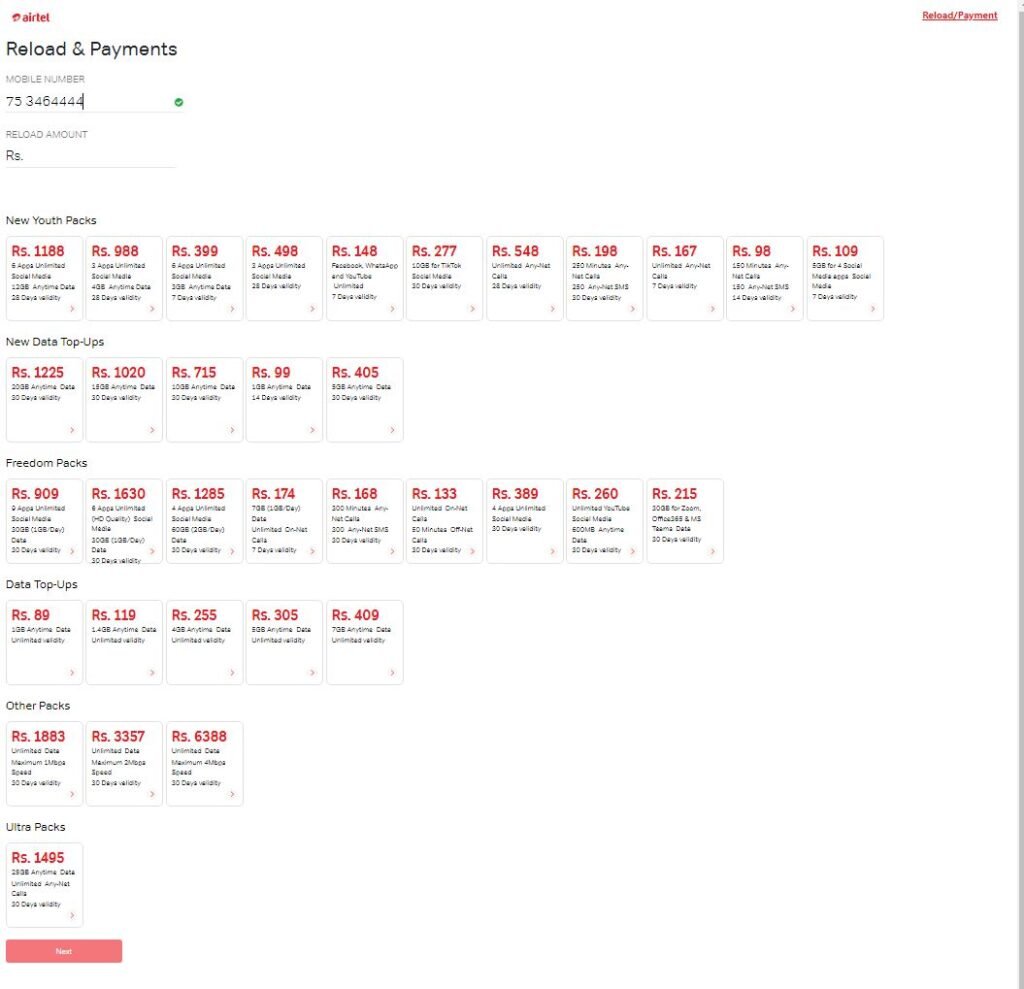
New Youth Packs
Designed primarily for younger users or budget-conscious smartphone owners, these packs offer a mix of social media accessibility and anytime data volumes:
- Rs. 1,188 Pack: Provides 12GB of anytime data with unlimited access across 6 select social media and communication apps, valid for 28 days.
- Rs. 988 Pack: Features 4GB of anytime data alongside unlimited access to 3 specific social media apps, valid for 28 days.
- Rs. 399 Pack: Delivers 3GB of anytime data with unlimited access to 6 social apps over a compact 7-day validity window.
- Rs. 498 Pack: Offers 3 apps with unlimited social media access, structured with a 28-day validity period.
- Rs. 148 Pack: Focuses on core messaging apps (Facebook, WhatsApp, and YouTube) with unlimited access spanning 7 days.
- Rs. 277 Pack: Allocates 10GB dedicated strictly to TikTok social media usage over a 30-day period.
- Voice-Focused Youth Packs: Options such as the Rs. 548 Pack (unlimited any-net calls for 28 days), Rs. 198 Pack (250 minutes of any-net calls and 250 any-net SMS valid for 30 days), and smaller short-term tiers like Rs. 167, Rs. 98, and Rs. 109 cater to users who prioritize talk time over massive data buckets.
New Data Top-Ups
For users who run out of base data before their cycle ends, dedicated top-up tiers provide quick volume boosts without altering primary voice plans:
- Rs. 1,225: 20GB Anytime Data (30 Days validity)
- Rs. 1,020: 15GB Anytime Data (30 Days validity)
- Rs. 715: 10GB Anytime Data (30 Days validity)
- Rs. 405: 5GB Anytime Data (30 Days validity)
- Rs. 99: 1GB Anytime Data (14 Days validity)
Heavy-Duty Unlimited and Anytime Data Packs
For power users running home hotspots or handling intensive streaming, the portal displays heavier standalone options along the sidebar:
- 12GB Pack (Rs. 1,188): Includes unlimited calls across select apps with a 28-day validity window.
- 25GB Anytime Data (Rs. 1,495): Bundled with unlimited voice calls and 1,000 any-net SMS (30 days validity).
- 40GB Anytime Data (Rs. 1,895): Includes unlimited voice calls and 1,000 any-net SMS (30 days validity).
- 75GB Anytime Data (Rs. 2,595): Features unlimited voice calls and 1,000 any-net SMS (30 days validity).
- 100GB Anytime Data (Rs. 2,995): Includes unlimited voice calls and 1,000 any-net SMS (30 days validity).
- 200GB Anytime Data (Rs. 3,999): The largest standard tier, providing 200GB of anytime data, unlimited voice calls, and 1,000 any-net SMS valid for 30 days.
Step-by-Step Payment Gateway Execution
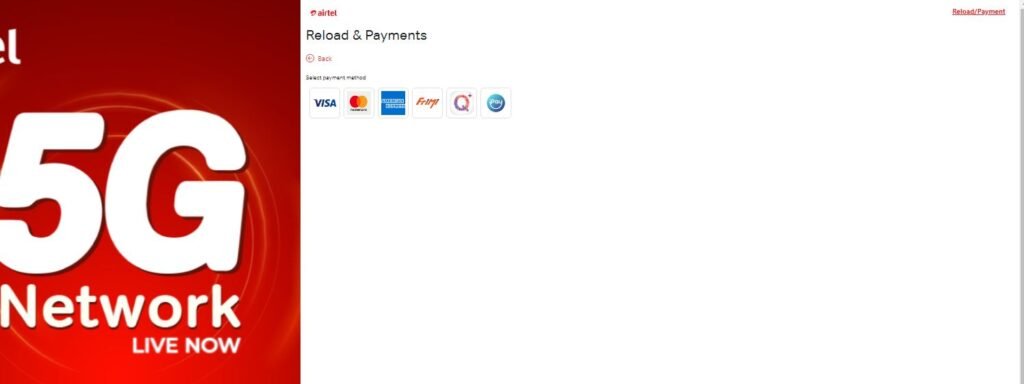
Choosing a specific reload amount or package seamlessly transitions the user to the payment phase, handled securely through robust banking infrastructure like the HNB Internet Payment Gateway (IPG).
- Select Payment Method: The portal provides multiple convenient channels to settle your transaction, including major credit and debit card brands like Visa, Mastercard, and American Express, as well as digital wallet solutions such as Frimi, Q+, and iPay.
- Enter Card Credentials: If choosing a card payment option, the secure payment interface prompts you to fill out mandatory fields:
- Card Type: Select either Visa or Mastercard radio buttons.
- Card Number: Input your 16-digit card number accurately without spaces.
- Expiration Date: Select the correct expiration month and year from the dropdown menus.
- CVN / CVV Code: Enter the 3-digit security code found on the back signature strip of your credit or debit card.
- Review Order Summary: The right-hand panel displays a clear summary of your transaction, verifying the exact total amount in Sri Lankan Rupees (e.g., Rs. 1,188.00) before money is debited.
- Complete Bank Authentication: Click the Next button to trigger your bank’s two-factor authentication window (such as an OTP sent via SMS). Once verified, the transaction processes instantly.
Troubleshooting Common Reload and Gateway Errors
Even with a streamlined online portal, users occasionally face minor hurdles during reloads or package activations. Knowing how to resolve them keeps disruptions to a minimum:
- Transaction Timeouts: If the payment gateway freezes or times out during the bank OTP stage, avoid refreshing or hitting the back button repeatedly to prevent duplicate card charges. Check your online banking app to verify whether the deduction went through before attempting a new transaction.
- Unreflected Balance: If a reload payment succeeds but your account balance or data quota does not update immediately, restart your mobile device to force a fresh network handshake. You can also dial the carrier’s USSD inquiry strings or log into the companion mobile app to force a manual sync.
- Incorrect Number Input: Always double-check your mobile number before proceeding to payment. Entering a single incorrect digit will route the reload to an unintended recipient, as digital reloads are processed instantly and are non-refundable once credited.
Read more related articles: Click here
Airtel Web portal link: Click here